
In the past, I’ve written about a duplicate grand total problem in Excel’s automatic Subtotals feature. Yesterday I noticed another problem, and it was nasty surprise!
Excel Subtotal Screen Shots
This week, I was updating the Excel Subtotals Feature page on my Contextures site, and getting a few new screen shots.
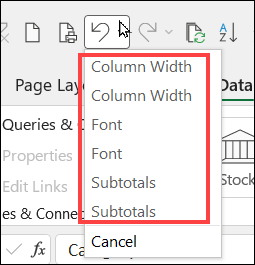
First, I added a couple of Subtotals to a worksheet list, then I made a couple of small changes to the worksheet.
Here’s the Undo list, showing those changes.
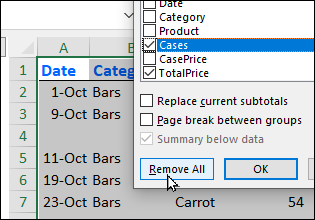
Next, I took a screen shot of the Subtotal dialog box, showing the Remove All button.
Remove All Button Impact
To get ready for the next screen shot, I clicked the Remove All button.
Sometimes, Excel asks you to confirm an action, like the message you get when you try to delete a worksheet.
However, for the Remove All button, there wasn’t a confirmation message.
- The Subtotal dialog box closed automatically
- All the subtotals were removed from the worksheet list
Try to Undo the Remove All
Next, I decided to put the subtotals back, so I could get a different screen shot.
And that’s when I got the nasty surprise – the entire Undo stack had been wiped out!
The Undo command on my Quick Access Toolbar was dimmed out – there was nothing left in the list.
So, my only choice was to rebuild the Subtotals from scratch.

Be Prepared Before Remove All
So, here’s my advice to you, if you’re using the Subtotal feature.
Before you click the Remove All button, to remove all the subtotals, do this:
- Save your workbook
- Make a backup copy of your workbook
After that, you can remove the subtotals.
Just remember that there’s no way to undo that action, and get your Subtotals back.
Video: Excel Subtotals Feature
In this short video, you’ll see how to create automatic subtotals with the Microsoft Excel Subtotal command.
Also, there’s a demo of duplicate grand totals problem, and the steps to prevent that.
The written instructions and sample file are on the Excel Subtotals Feature page on my Contextures site.
______________
Excel Subtotal Feature Problems
______________