XLOOKUP in Excel (Better than VLOOKUP)
Learn how to use the powerful XLOOKUP function in Excel to retrieve data easily and efficiently. In this tutorial, you will see how XLOOKUP can return multiple columns at once, making it a better and more flexible alternative to traditional lookup formulas.
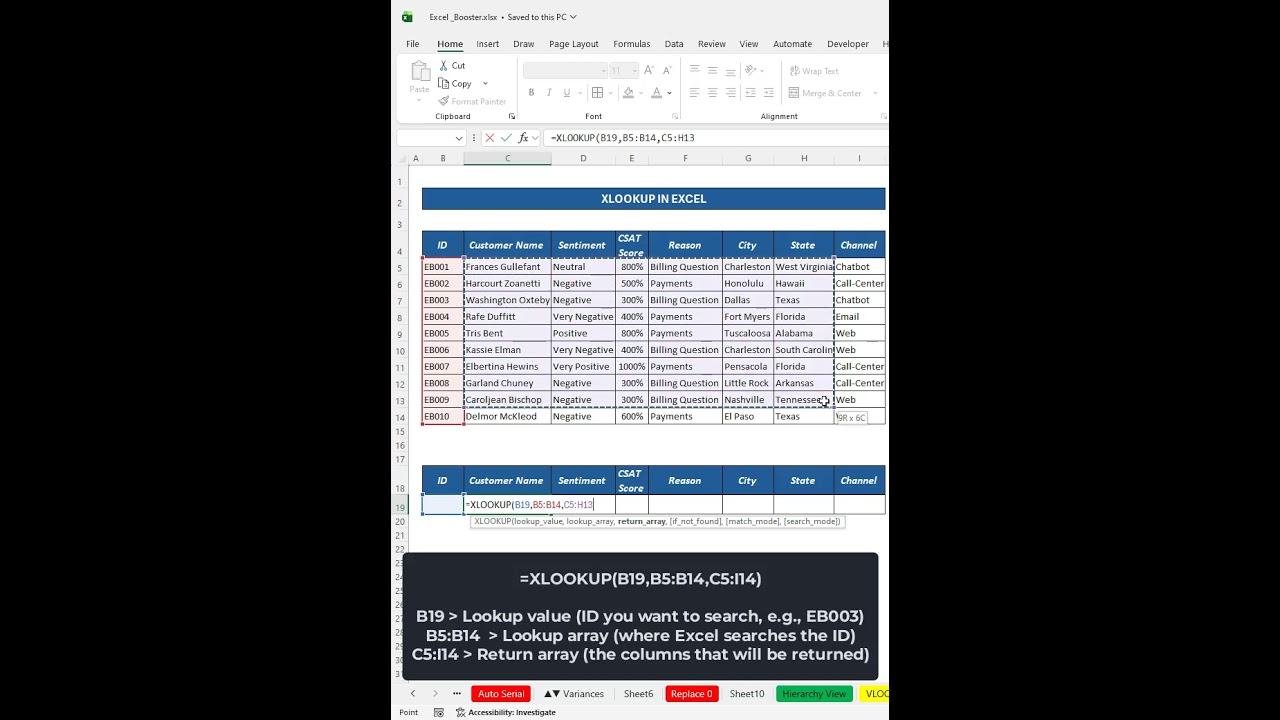
In this video, we demonstrate how to search a Customer ID and automatically return details like Customer Name, Sentiment, CSAT Score, Reason, City, State, and Channel using a single formula.
???? Formula Used in this Video:
=XLOOKUP(B19,B5:B14,C5:I14)
???? What you will learn:
How XLOOKUP works in Excel
Returning multiple columns with one formula
Faster alternative to VLOOKUP
Practical example using customer data
Excel tips for data analysis
This tutorial is perfect for Excel beginners, data analysts, office professionals, and students who want to improve their Excel skills.
???? If you found this helpful, Like, Share & Subscribe for more Excel tips and tutorials.
#Excel #XLOOKUP #ExcelFormulas #ExcelTips #DataAnalysis #ExcelTutorial